Table of contents
AI can summarize a HubSpot record in seconds. That does not mean it knows whether the information is current, whether it was permitted to see it, or whether a recommended action is safe to write back into the CRM.
As teams move from AI experiments to real customer workflows, the boundaries become the hard part. A workflow may need a customer record from HubSpot, a procedure from a private knowledge base, a current fact from a system of record, a model to draft or classify something, and a human to approve the next action. Those responsibilities should not be collapsed into one prompt.
This is why private retrieval, memory, and orchestration belong in the same conversation. They answer three different questions:
- What approved knowledge can the AI use?
- What context or workflow state should persist?
- Which deterministic steps control review, execution, and audit?
This article explains how those pieces can sit around HubSpot without turning every use case into an unnecessarily complex stack. For a simple HubSpot-only workflow, native permissions, workflows, and approvals may be sufficient. Additional retrieval or orchestration is justified when the workflow needs private knowledge, external systems, redaction, retries, or cross-system coordination.
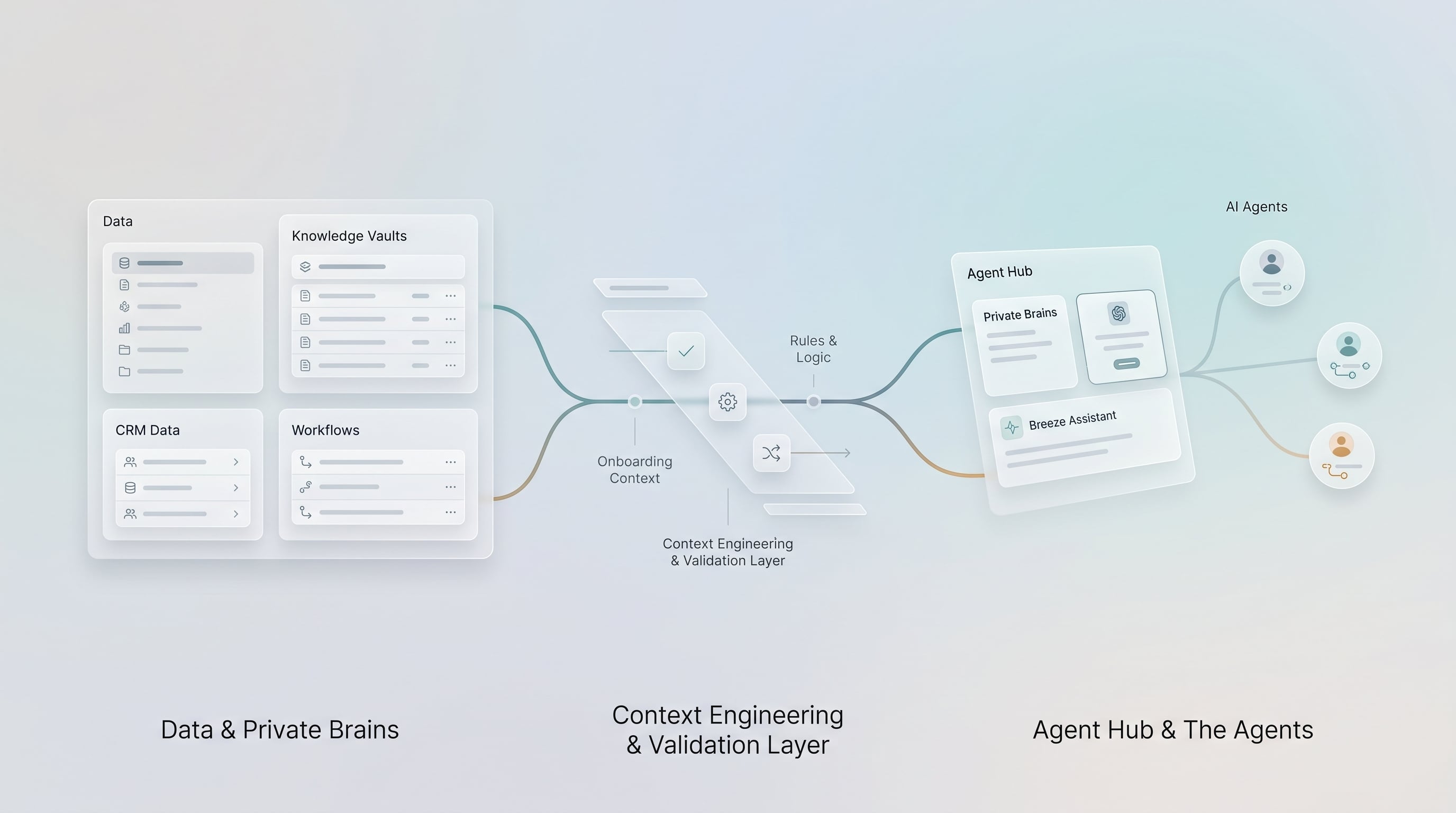
The goal is not more components. The goal is clear responsibility: HubSpot coordinates customer work, private retrieval supplies source-backed context, memory preserves selected state, and workflow controls decide what can happen next.
Before choosing tools, ask:
- What information can it access?
- Where does that information come from?
- What is the system of record?
- What can the model recommend?
- What can it update?
- Who approves sensitive actions?
- What gets logged?
- What happens when the model is wrong?
Short Answer
Private retrieval gives AI access to approved knowledge without stuffing everything into HubSpot or prompts. Memory stores selected state over time, but should not be confused with source-backed retrieval. For a simple CRM-only workflow, HubSpot permissions and workflows may be enough to control actions. When the process crosses system boundaries or needs additional controls, n8n or equivalent orchestration can manage data gathering, redaction, approvals, retries, logging, and writeback to HubSpot or core systems.
Learners.ai POV
The most important AI CRM design question is where workflow control should live.
HubSpot can govern many CRM-only actions through permissions, workflows, and approvals. Retrieval can supply approved knowledge. External orchestration such as n8n becomes useful when the workflow crosses system boundaries or needs controls that HubSpot cannot provide alone.
Whatever tool is used, something still has to decide what happens next, which action is allowed, which approval is required, and what gets logged.
That "something" should not be left to a prompt. It should be an explicit workflow.
For financial services teams, this is the difference between experimenting with AI and building AI workflow infrastructure.
HubSpot Is Not Your Whole Knowledge Layer
HubSpot is a CRM and workflow platform. It should hold customer records, activities, lifecycle context, tickets, deals, tasks, lists, campaigns, and the data your teams need to operate.
It should not become the dumping ground for every internal document, transcript, product rule, policy manual, service procedure, claims note, underwriting guide, or compliance reference.
That is especially true in financial services.
Some knowledge should remain in document systems, core platforms, data warehouses, private search indexes, or controlled knowledge repositories. The AI workflow may need that knowledge, but HubSpot does not need to own all of it.
The better pattern is:
- HubSpot holds the customer workflow context.
- Private retrieval holds approved knowledge access.
- Core systems remain the source of truth for operational data.
- Orchestration coordinates what gets read, recommended, approved, and written.
Private Retrieval: Source-Backed Context
Private retrieval allows an AI workflow to search approved knowledge and return relevant source material.
This can include:
- Internal procedures
- Product rules
- Policy documents
- Training materials
- Service playbooks
- Meeting transcripts
- Approved marketing or communication guidance
- Compliance-reviewed support content
- Data warehouse records exposed through approved views
The important word is "approved."
Private retrieval should not mean "let the model search everything." It should mean the workflow can access the right knowledge for the use case, under the right permissions, with source visibility.
For example, a service agent handling a ticket may need an AI-generated summary of the relevant escalation procedure. The workflow should retrieve the approved procedure, show the source, and avoid relying on vague model memory.
Why Hybrid Search Often Matters
Vector search is useful, but it is not always enough.
In CRM and financial services workflows, users often search for exact terms:
- Account numbers
- Product names
- Policy types
- Procedure names
- Regulatory phrases
- Internal acronyms
- Ticket categories
Hybrid search combines semantic retrieval with keyword matching. That can be useful when the workflow needs both conceptual matching and exact terminology.
The tool choice can vary. Weaviate is one option because it supports hybrid search, role-based access control, and audit-related logging patterns. Other platforms may fit better depending on the organization's cloud and data stack.
The architectural point is larger than the vendor:
Retrieval should be source-backed, permission-aware, and auditable.
Decision Table: Retrieval, Memory, Or Workflow State?
| Need | Use | Why |
|---|---|---|
| Find the approved procedure for a service issue | Private retrieval | The answer should come from a source document the user can verify. |
| Remember a user preference for summary format | Memory | This is persistent interaction context, not business truth. |
| Track whether a manager approved an AI recommendation | Workflow state or CRM record | Approval status must be explicit, reportable, and auditable. |
| Pull current policy, account, or billing facts | Core system or approved API | The source system should remain the truth for operational data. |
| Explain why a ticket was escalated | Log plus CRM activity | The business needs traceability after the workflow runs. |
| Reuse a prior model answer | Usually neither | Use fresh retrieval or stored approved outputs when accuracy matters. |
Memory Is Not Retrieval
Memory and retrieval are often blurred together, but they solve different problems.
Retrieval answers:
What approved source material is relevant right now?
Memory answers:
What selected context should persist across interactions or workflow runs?
For example:
- Retrieval finds the current escalation procedure.
- Memory remembers that this account was previously flagged for renewal risk.
- Retrieval finds the product rules.
- Memory remembers that a user prefers summaries in a certain structure.
- Retrieval finds the approved complaint procedure.
- Memory remembers the workflow state after a human requested clarification.
Memory is powerful, but risky if used casually.
For financial services workflows, memory should be explicit, limited, and inspectable. Do not let AI quietly accumulate sensitive customer context without a governance model.
When n8n Becomes the Deterministic Spine
External orchestration is not automatically required. If the process stays inside HubSpot, native workflows and custom code actions may be enough. n8n or another orchestration platform becomes useful when the workflow needs external systems, private retrieval, redaction, complex retries, human-review gates, or coordinated writeback across more than one system.
Tools such as n8n can coordinate that expanded workflow around HubSpot:
- Trigger from HubSpot or another system
- Fetch CRM data
- Call approved external systems
- Retrieve private knowledge
- Redact or transform data
- Call an AI model
- Pause for human review
- Validate required fields
- Write back to HubSpot
- Notify teams
- Log the result
The AI model should not own all of that, and neither should an external tool be added unless the workflow needs it.
The model can summarize, classify, draft, recommend, and reason. The workflow should decide what happens next.
This expanded pattern is buildable with n8n, custom middleware, or another orchestration platform. A simpler HubSpot-only workflow may use native HubSpot controls instead. The exact tool can vary; the control responsibilities should remain explicit.
A Secure HubSpot AI Workflow Example
Consider a financial services service-ticket workflow.
- A new ticket is created in HubSpot.
- n8n receives the event and checks the ticket category, company, contact, and recent activity.
- The workflow retrieves approved internal procedures related to the issue.
- Sensitive details are redacted where appropriate.
- The model summarizes the issue, suggests a category, and flags whether escalation may be needed.
- If the category is low-risk, the workflow drafts a response or task for review.
- If the category is high-risk, the workflow routes it to a supervisor.
- The human approves or changes the recommendation.
- HubSpot is updated with the final category, internal note, task, and status.
- The workflow logs the source records, retrieved documents, recommendation, approval, and final action.
That is a production workflow.
It is not just an AI prompt.
Why This Matters For Financial Services
Financial services teams have a different risk profile than generic SaaS teams.
AI workflows may touch:
- Client communications
- Complaint handling
- Advisor or producer notes
- Account servicing
- Renewals
- Lending workflows
- Insurance policies
- Suitability or risk context
- Regulated records
- Internal procedures
That does not mean AI cannot be used. It means the workflow needs controls.
Private retrieval helps ensure the model uses approved sources. Orchestration controls the process. Human approval governs sensitive actions. Logging preserves accountability.
The Role Of HubSpot MCP
HubSpot's Remote MCP Server and MCP-related ecosystem make it easier for AI tools to access supported HubSpot data and actions. That is useful, but it should not be confused with private retrieval or workflow governance.
HubSpot MCP can help with CRM access.
It does not replace:
- A private knowledge index
- Redaction logic
- Human approval steps
- System-of-record validation
- Audit logging
- Data retention decisions
- Workflow ownership
This is one of the most important points for buyers to understand.
MCP is a tool-access pattern. It is not the whole operating model.
What To Log
At minimum, a serious AI CRM workflow should consider logging:
- Trigger event
- User or system initiating the workflow
- HubSpot record IDs involved
- External systems queried
- Retrieval sources used
- Model output
- Human approval or rejection
- Final writeback action
- Timestamp
- Workflow version
- Prompt or policy version where appropriate
The goal is not to bury teams in logs. The goal is to create enough traceability that the business can understand how AI-assisted work happened.
What To Avoid
Avoid:
- Treating private retrieval as unrestricted document search
- Confusing model memory with approved source retrieval
- Sending sensitive CRM data into broad prompts
- Letting AI write to HubSpot without validation
- Using MCP as if it replaces permissions and approvals
- Logging sensitive data into systems that should not hold it
- Building workflows nobody owns after launch
The risk is not that AI participates in the workflow. The risk is that nobody designs the workflow.
Final Takeaway
Private retrieval, memory, and orchestration are not three mandatory add-ons. They are three separate design responsibilities that help an AI CRM workflow remain trustworthy as its complexity increases.
For HubSpot teams, the strongest architecture is:
- HubSpot for CRM context and workflow execution
- Private retrieval for approved knowledge
- Memory only where persistent state is intentional
- HubSpot workflows for CRM-only control, with n8n or equivalent middleware when external orchestration is needed
- Human approval for sensitive actions
- Logs for traceability
That is how financial services teams can use AI around HubSpot without turning customer workflow into unmanaged automation.
Practical Next Step
Pick one workflow and draw the control path before choosing the AI model. Identify the trigger, allowed data sources, retrieval source, model task, approval point, writeback action, and log record. If any of those are missing, the workflow is not ready for production.