Table of contents
Claude and HubSpot are a strong pairing, but not because every CRM process should move into a chat window.
The better way to think about Claude is as a reasoning and synthesis layer around HubSpot workflows. Claude can help users analyze complex context, prepare summaries, draft communications, review policies, and work through decisions that require more than a simple field update.
HubSpot remains the CRM workflow layer. Claude can become the assistant that helps humans reason through the work.
That distinction matters.
Short Answer
Claude can support HubSpot workflows through the official HubSpot connector for Claude, MCP-based tool access, or custom middleware. The official connector is useful for giving Claude HubSpot context and, in beta, creating or updating CRM records and logging activities. For regulated or complex workflows, teams should still use governed architecture: narrow tools, user permissions, human approval, audit logs, and clear separation between recommendation and execution.
Learners.ai POV
Claude is strongest when the CRM work requires judgment, synthesis, and careful language.
That does not mean Claude should become the system of record or the uncontrolled writeback layer. The better pattern is supervised reasoning: Claude helps the user understand the situation and prepare a recommendation, while HubSpot, middleware, and human approval control the operational action.
In financial services, that distinction is not academic. A meeting prep summary, complaint triage recommendation, or renewal note can affect client communication and internal records. The workflow needs to know when Claude is assisting and when the business is deciding.
Why Claude Fits Certain CRM Workflows
Some CRM work is straightforward:
- Create a task.
- Update a deal stage.
- Add a note.
- Route a ticket.
- Enroll a contact in a sequence.
Other CRM work is judgment-heavy:
- Prepare for a complex renewal conversation.
- Summarize a long account history.
- Compare policy or product details against a client situation.
- Draft a sensitive follow-up.
- Review service history before escalation.
- Synthesize notes, emails, tickets, and internal guidance.
Claude is especially useful in the second category. It can help a user reason across messy context and produce a structured draft, summary, or recommendation.
The workflow should still decide what happens next.
The Official HubSpot Connector For Claude
HubSpot now offers an official connector for Claude in the HubSpot marketplace.
That creates a practical buyer question:
If HubSpot has a Claude connector, when is that enough and when do we still need custom architecture?
The connector is useful when a user wants Claude to access HubSpot context inside Claude. HubSpot describes the connector as a way to access HubSpot context in Claude, and the marketplace listing says beta capabilities can create or update CRM records and log activities such as notes and tasks.
That is useful. It also makes governance more important.
Teams should confirm:
- Which HubSpot objects the connector can access
- Whether the connector can access the needed custom objects or properties
- Whether sensitive properties are excluded
- What the user is allowed to see based on HubSpot permissions
- What actions are supported
- Whether write actions are acceptable for the workflow
- How activity is reviewed and logged
The connector can reduce friction. It does not remove the need for workflow design.
Decision Table: Connector, MCP, Or Custom Architecture?
| Need | Best-fit pattern | Why |
|---|---|---|
| Ask Claude questions about standard HubSpot context | Official HubSpot connector for Claude | Lowest-friction way to bring HubSpot context into Claude where supported. |
| Create or update supported CRM records from Claude | Official connector, if the capability and permissions fit the use case | Useful for low-risk CRM work, but still requires admin review of permissions and sensitive-data limits. |
| Analyze approved private documents alongside CRM context | Retrieval plus Claude | Keeps source-backed knowledge separate from CRM fields and general model memory. |
| Govern writeback for sensitive workflows | Middleware plus HubSpot APIs or controlled MCP tooling | Lets the workflow validate, require approval, and log the final action. |
| Coordinate several systems beyond HubSpot | Custom workflow architecture | Needed when core systems, approvals, retries, and audit requirements matter. |
What To Verify Before Building
Before designing a Claude and HubSpot workflow, verify:
- Which HubSpot connector capabilities are available in the account.
- Which objects, properties, and activities Claude can access.
- Whether any Sensitive Data Properties or sensitive covered services are excluded.
- Whether create or update actions are available and acceptable for the use case.
- Whether the user permissions in HubSpot match the intended workflow.
- Whether a separate approval, validation, or logging layer is required.
This matters because the official connector can be useful without being the right control plane for every regulated workflow.
Where Claude Should Sit In A Governed Architecture
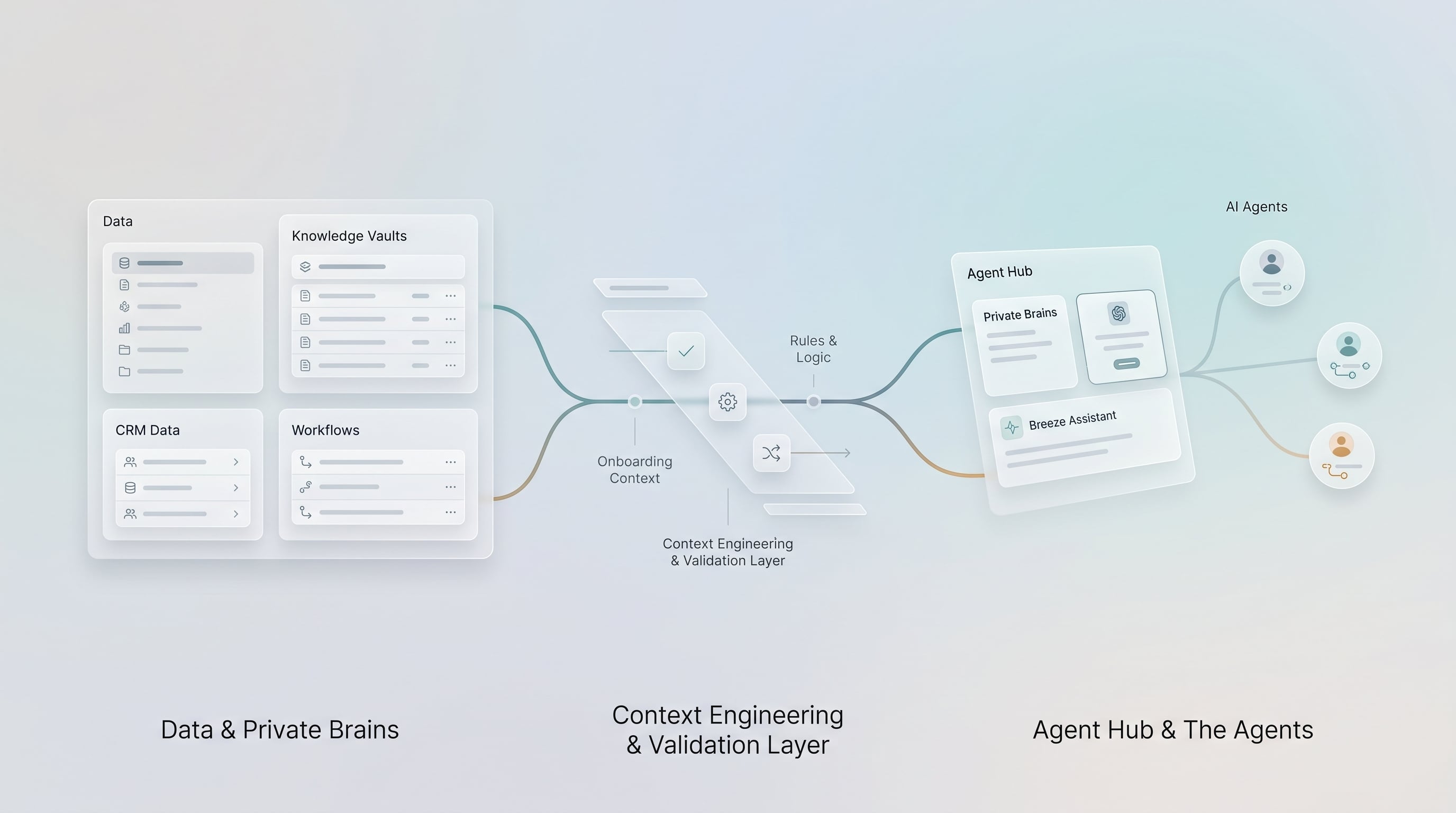
For serious CRM workflows, Claude should usually be one part of a larger system.
The pattern looks like this:
- HubSpot holds the CRM record and workflow context.
- Claude helps the user reason, summarize, or draft.
- Approved tools provide narrow access to external data or documents.
- Middleware handles validations, approvals, and writeback.
- HubSpot records the final action and relevant activity.
This is especially important in financial services, where a workflow may touch regulated communications, complaint handling, client suitability, account servicing, renewal risk, or internal policies.
Claude can prepare the decision. The workflow should govern the action.
Use Case 1: Account And Renewal Summaries
Claude can help summarize a complex company, household, advisor, producer, or account relationship.
Inputs might include:
- HubSpot company, contact, ticket, deal, and activity records
- Recent notes and tasks
- Open service issues
- Renewal dates
- Internal playbooks
- Approved policy or product context
- External account or policy data accessed through a narrow tool
The output should be structured:
- Relationship summary
- Recent activity
- Open risks
- Service issues
- Renewal or opportunity context
- Recommended questions
- Suggested next steps
The system should show the sources used and require human review before anything is sent externally.
Use Case 2: Service And Escalation Review
Claude can help a service team understand whether an issue is routine, urgent, or potentially sensitive.
For example, it can summarize a ticket, compare it with recent activity, and suggest whether the matter may need escalation.
But Claude should not make the final compliance call.
A governed workflow should separate:
- Classification assistance
- Human review
- Escalation decision
- CRM update
- Audit log
That separation allows the team to use AI without pretending the model is accountable for the business decision.
Use Case 3: Drafting With Context
Claude can draft emails, internal notes, meeting summaries, or handoff messages using HubSpot context and approved instructions.
This is often safer than asking a user to paste CRM data into a generic chat because the connector or workflow can control which data is available.
Still, outbound communication needs review.
The best pattern is:
- Claude drafts.
- The user reviews.
- The workflow checks required fields or disclaimers.
- The approved communication is sent or logged through the proper system.
Use Case 4: Policy Or Procedure Assistance
Financial services teams often need internal guidance while working a customer issue.
Claude can help interpret approved internal documents, but the retrieval layer should control what it can access. For example, a service agent might ask for the approved escalation procedure for a certain category of issue. Claude can summarize the relevant procedure and cite the source, but the system should preserve the source reference and avoid inventing policy.
This is where private retrieval becomes important. Claude should not rely on memory or vague general knowledge when the answer must come from internal policy.
Financial Services Workflow Patterns
| Workflow | Claude's useful role | Control that should stay outside Claude |
|---|---|---|
| Wealth advisor prep | Synthesize HubSpot activity, meeting notes, and approved planning context into a brief. | Keep custodial data source-backed and require advisor review before use. |
| Insurance renewal review | Summarize service history, open tickets, and prior renewal notes. | Pull policy truth from the right system and require review before client communication. |
| Banking relationship review | Prepare banker questions from CRM history and approved relationship context. | Avoid unrestricted account data and require approval before lifecycle or risk-status changes. |
| Complaint escalation support | Summarize facts and identify possible escalation indicators. | Human classification, routing, and recordkeeping decision. |
When The Official Connector May Be Enough
The official connector may be enough when:
- The user needs read access to standard HubSpot context.
- The workflow is exploratory or analytical.
- The user is working individually inside Claude.
- The data does not involve excluded sensitive properties.
- The action risk is low.
- The organization is comfortable with the connector's available permissions and terms.
Examples:
- Ask Claude to summarize open deals for prep.
- Review recent tickets before a meeting.
- Draft an internal follow-up note for human review.
- Analyze CRM activity patterns.
When You Need Custom Architecture
Custom architecture becomes more important when:
- The workflow needs private retrieval outside HubSpot.
- The workflow touches sensitive, regulated, or client-impacting data.
- The action needs deterministic validation.
- The organization needs structured approvals and logs.
- The workflow must integrate with core systems.
- The business needs repeatable automation, not only one-off chat assistance.
- Multiple AI tools or user groups need the same governed workflow.
Examples:
- Complaint escalation workflow
- Renewal prep across HubSpot, AMS, and policy systems
- Wealth advisor prep using CRM plus custodial or planning context
- Banking relationship workflow that references core banking or lending systems
- AI-generated CRM updates that require review and audit history
The Governance Checklist
Before using Claude in a HubSpot workflow, answer these questions:
- What HubSpot records can Claude access?
- Which properties or objects are excluded?
- What external systems are involved?
- Is retrieval based on approved source documents?
- What can Claude draft versus update?
- Who approves sensitive actions?
- What gets logged?
- How are errors or hallucinations handled?
- Who owns the workflow after launch?
If those questions are unanswered, the risk is not Claude. The risk is the operating model around Claude.
Final Takeaway
Claude can be a powerful assistant for HubSpot teams, especially where the work requires synthesis, preparation, and careful reasoning.
But the serious version is not "Claude connected to CRM."
The serious version is governed CRM workflow architecture:
- HubSpot holds the customer workflow context.
- Claude helps users reason and draft.
- Narrow tools expose approved data.
- Human approval controls sensitive actions.
- Middleware handles validations and writeback.
- HubSpot records the outcome.
That is how Claude becomes useful without turning CRM governance into a prompt.
Practical Next Step
For a Claude and HubSpot workflow, start by choosing whether the work is read-only analysis, human-reviewed drafting, or CRM writeback. If it is writeback, define the approval and logging path before giving the assistant access to the action.