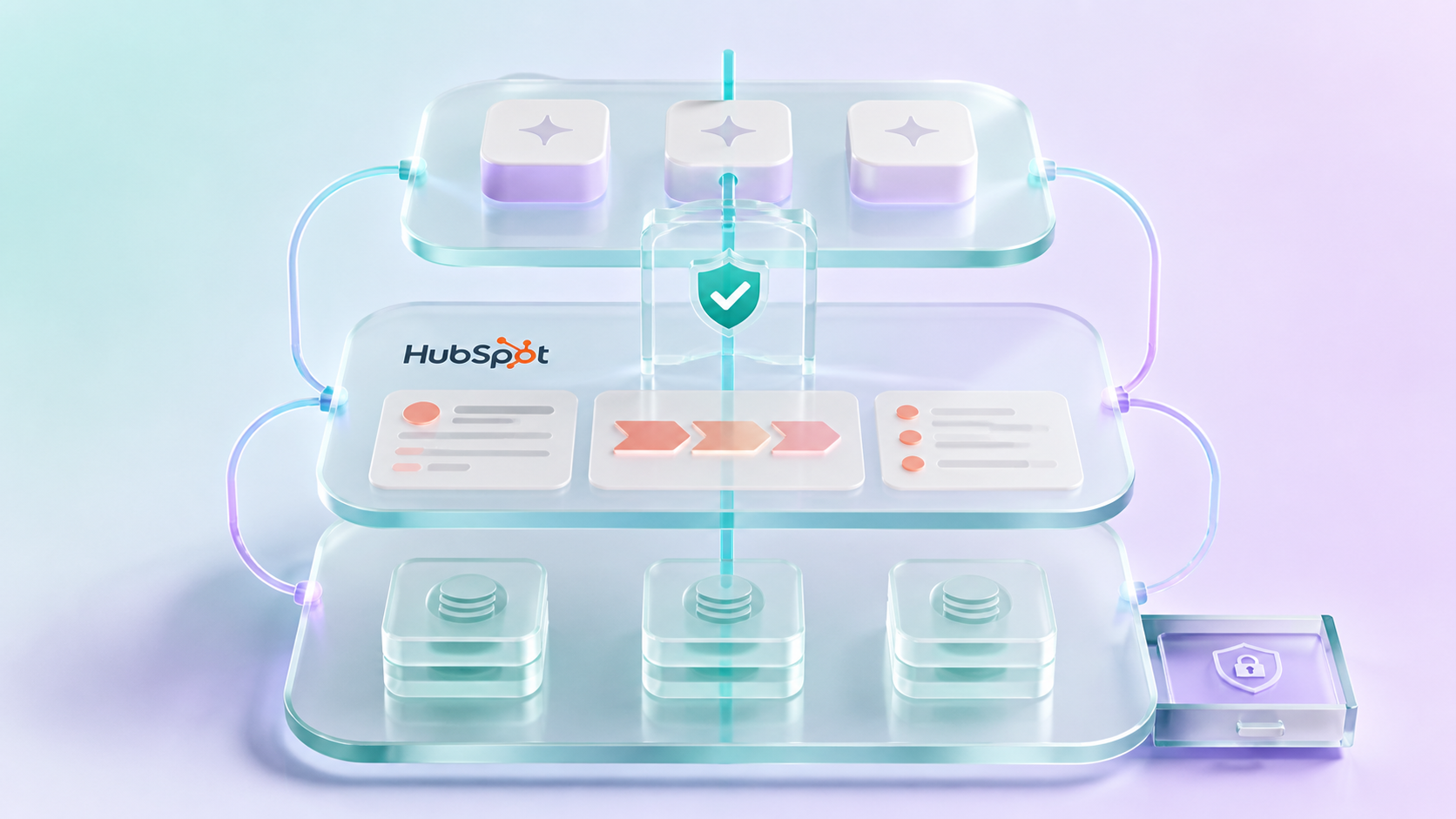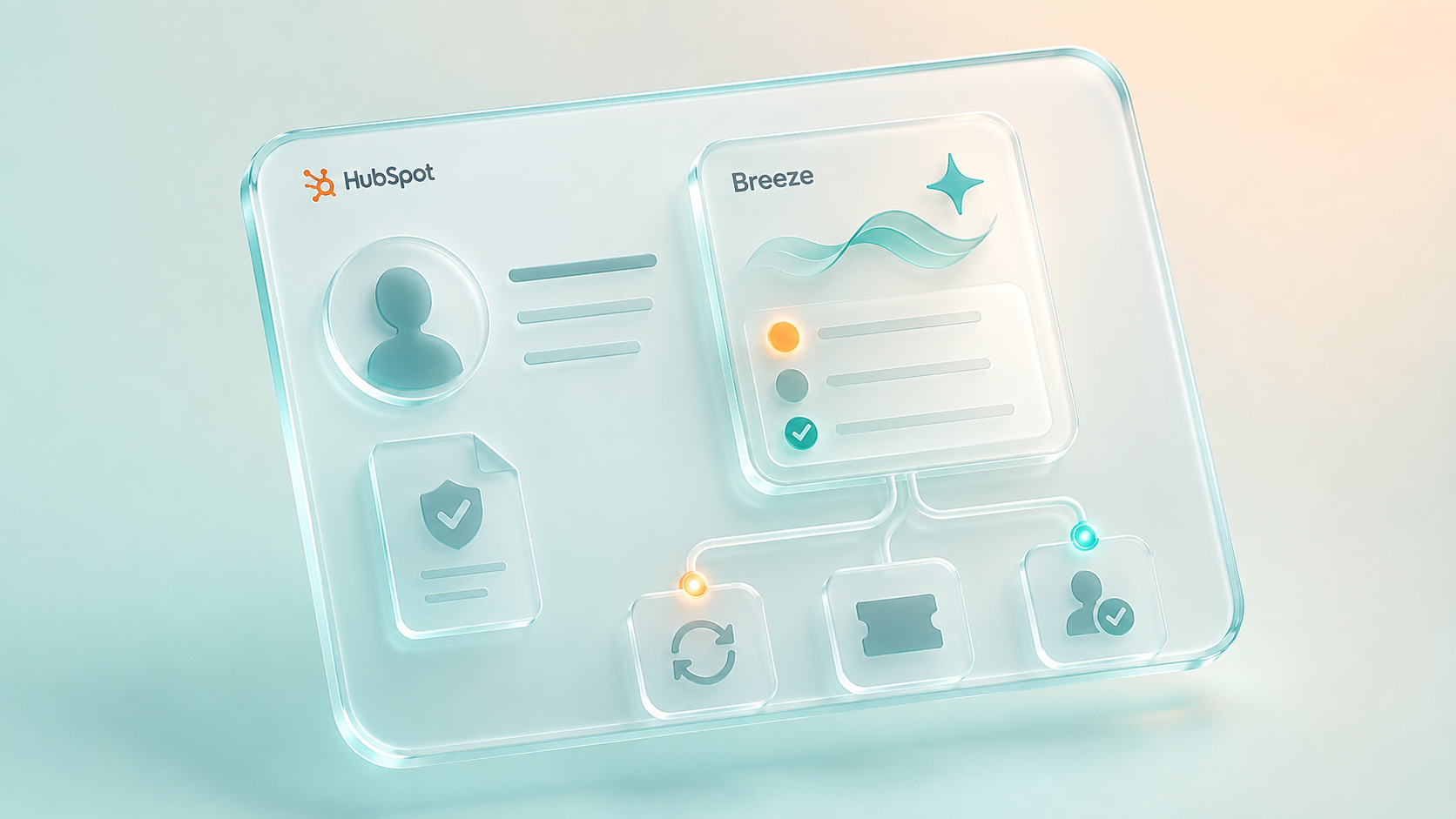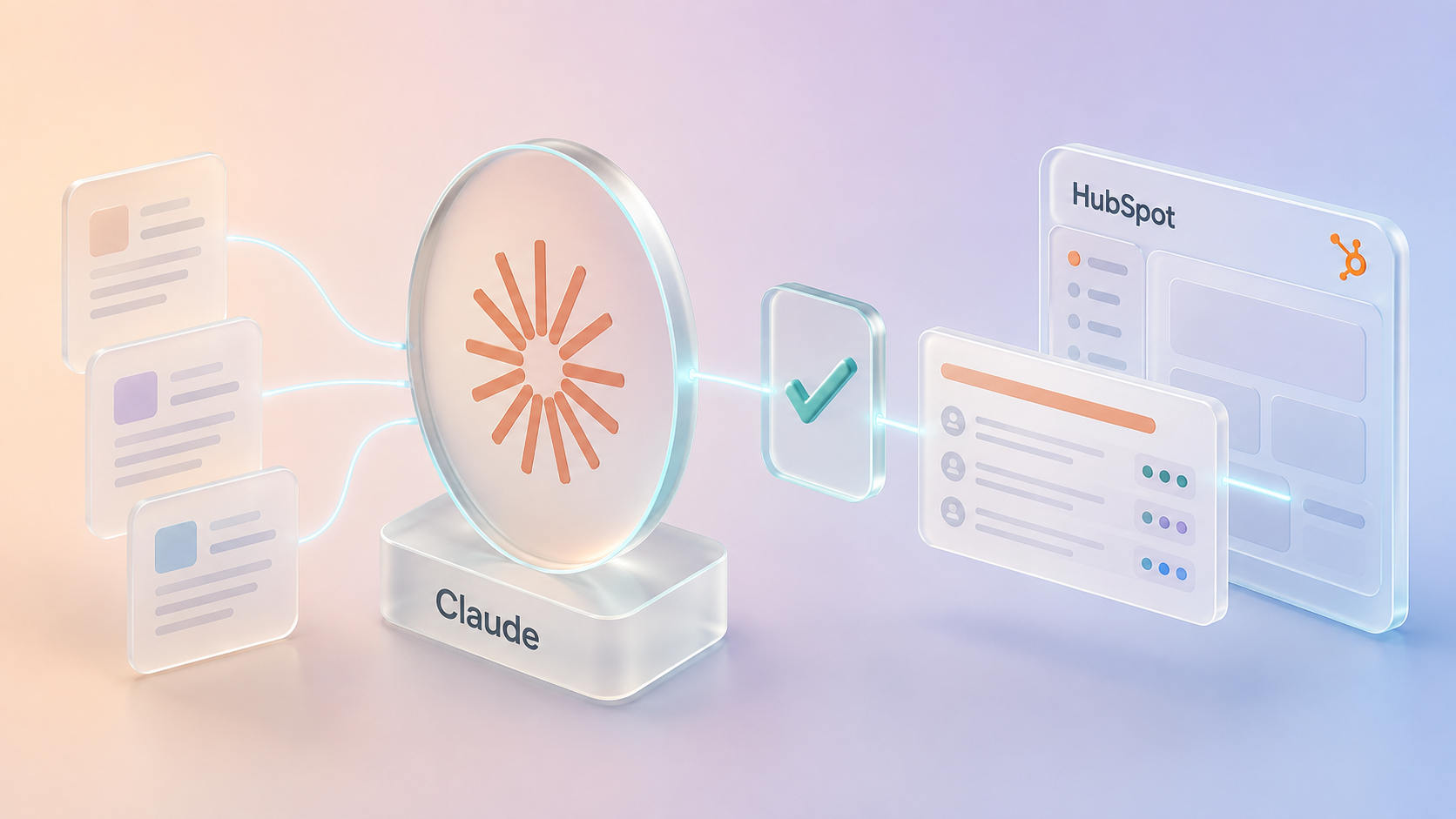
Businesses have spent years collecting customer data in their CRMs. Now they're looking to AI agents to put that information to work. But how ready is that information for agents to use reliably?
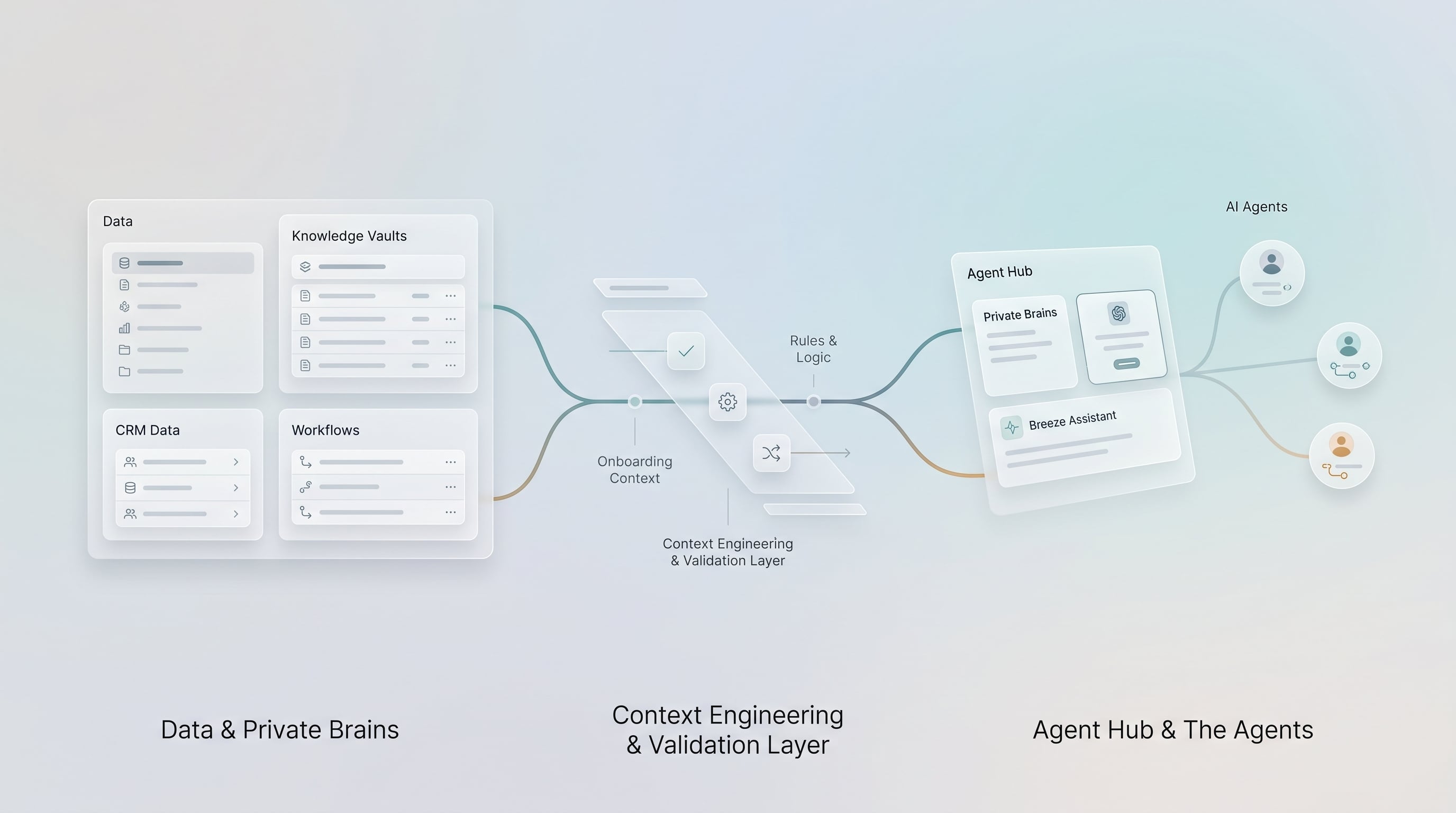
Context engineering in HubSpot means making the information its AI agents rely on accurate, current, clearly defined and appropriate to use. That includes Growth Context in Context Home, knowledge vaults, CRM data and property definitions, agent instructions, permissions and the workflows an agent may affect.
HubSpot’s latest releases put greater emphasis on the context agents use. Turning that capability into reliable results requires deliberate preparation of the information behind each agent.
What an Agent Sees Before It Answers
A CRM may work well for the people who use it every day while leaving an AI agent to guess. Employees know which fields have been retired, which documents supersede old instructions and when a workflow needs attention. An agent relies on what the system tells it. In a recent insurance engagement, we tested this with a read-only HubSpot assessment involving more than 650 API reads and no changes to customer records.
Across more than 600 custom properties, roughly 78% were populated on 1% of records or fewer. More than four in five lacked descriptions, and over 150 custom dropdowns had options without an explanation of their meaning. These findings showed where an agent could misread the business information already in the portal.
Those fields were manageable for employees who knew the history of the portal. They were much less useful to an agent. A property labeled “Type (old)” gives no indication that it was retired years ago. Without a description or usage rule, an agent may infer its purpose from the name and choose the wrong field. The issue was not whether HubSpot could support an agent. It was whether the portal gave that agent enough reliable information to do its job.
I have spent close to twenty years working with CRM systems, including several years helping banks, insurers and wealth managers implement HubSpot. My background in quantitative finance and machine learning shapes how we approach this work at Learners.ai. We understand the CRM, the underlying data, the integrations and the business processes agents must operate within. That combination matters because an AI system design and build can fail even when the model performs well.
HubSpot's latest releases make this a timely operational question. This article examines what changed in the platform, how we assess and prepare context, why we build private business brains that can support HubSpot and other systems, and how that work shapes five types of agent.
What HubSpot Actually Shipped
During 2026, HubSpot expanded its approach to AI around Growth Context, the business, team and customer information that informs work across the platform. At UNBOUND in September, Chief Product and Technology Officer Duncan Lennox described the CRM as a "system of context," as reported by diginomica.
The table below separates HubSpot’s published capabilities from details reported by industry publications, using the information available in early October 2026.
| Capability | What it is | Status | What it changes for context engineering |
|---|---|---|---|
| Growth Context | HubSpot's name for the business, team and customer understanding that AI features draw on. Lennox breaks it into business, team, process, customer and network context (HubSpot). | Platform direction, Spring and Fall 2026 | Business context becomes a maintained part of the AI environment rather than an instruction pasted into each prompt. |
| Context Home | The Context tab in Agent Hub: Business (brand kit, profile, products and services), Customers (ICPs, personas), Team & Processes (sales methodology), Personal (user profiles, email personalities), Custom context and Knowledge vaults (KB). Context syncs from connected sources; direct edits take precedence; HubSpot flags context that may be outdated. | New, all products and plans | A shared place to maintain standing context, with an ongoing need for ownership and review. |
| Knowledge vaults | Task-specific knowledge attached to agents and projects: files (PDF, DOCX, PPTX, XLSX, CSV, JSON, Markdown and more), HubSpot content such as KB articles, pages and calls, and segments. Up to 50 vaults, 50 MB per file, citations to page or section for PDF and DOCX files, four access levels. | Beta | Task-specific sources and permissions help keep retrieval relevant and appropriately scoped. |
| Aviator | What Lennox called HubSpot's new agentic harness. In HubSpot's developer docs, a harness is the software that runs a model in a loop, executes its tool calls and feeds the results back. Partner recaps of UNBOUND describe Aviator selecting a model for each task and supplying the context that task needs. | Announced at UNBOUND, September 2026 | HubSpot manages the agent runtime; teams still need to prepare and govern the context supplied to each task. |
| Agent Hub | One home for HubSpot-built and custom agents and agentic workflows, with an agent inbox, per-run credit cost, run history and monthly run limits per agent (martech.org). Replaced Breeze Studio. | Public beta from July 2026; redesigned at the Fall 2026 Spotlight | Agent owners can inspect activity, costs and runs in a common management environment. |
| Agent Builder | Custom agents from instructions, actions (HubSpot actions, CRM read and write, web, and an MCP tab for external systems), knowledge (vaults, brand kit, ICPs, integrations) and runtime inputs. Test runs consume no credits; agents run from CRM cards and from agentic workflows triggered by schedules, record changes, webhooks, Slack or Google Sheets (HubSpot). | Public beta at launch; now Starter, Professional and Enterprise | An app-hosted custom MCP server (public beta) offers a way for internal, human-reviewed agents to query a private brain. |
| HubSpot agents | Customer Agent (chat, email, social; voice in public beta), Prospecting Agent, Data Agent, the new Revenue Agent, and updated Knowledge Base, Campaign, Content and Nurture agents (Spotlight). | Customer, Prospecting and Data agents available; the other five in public beta | Shared business context makes consistency and verification important across agents. |
| Developer surface | An expanded HubSpot MCP Server with write access and custom objects, the Agent CLI, agent tools, granular scopes and app governance in which agents cannot exceed the permissions of the user they act for (developer spotlight). | Mostly unlabelled; agent tools and app-hosted MCP servers in beta | External agents can now act on HubSpot under least privilege, with an audit trail. |
| Outcome pricing | Since April 14, 2026, Customer Agent costs $0.50 per resolved conversation and Prospecting Agent $1.00 per lead recommended for outreach. HubSpot reports a 65% resolution rate and more than 8,000 customers on Customer Agent. | Live, Professional and Enterprise | Outcome pricing gives teams another reason to measure how knowledge quality affects service performance. |
Taken together, these releases give businesses more capable tools for deploying and managing agents. They also make the quality of CRM data, business definitions, approved knowledge and connected workflows more consequential. That is where our context engineering work begins.
What Context Engineering Actually Means
Context engineering is the practice of selecting and maintaining the information an agent needs for a specific task. That information must be accurate, relevant, current, understandable and permitted for the agent to use.
From a machine-learning perspective, a language model’s output is conditioned on what it receives. For most businesses, improving the model’s underlying weights is not an option. Improving its inputs is. Prompt engineering focuses on instructions. Context engineering covers the wider set of inputs: instructions, retrieved knowledge, CRM records, schema metadata, tools, memory and earlier results, all assembled within the limits of the task.
Three principles guide our work:
- Relevant context beats excess context. Irrelevant or contradictory tokens do not just cost money; they move the distribution. Early in our own brain work we stored whole meeting transcripts, 10,000 to 15,000 tokens each, as single objects, and retrieval dragged thousands of tokens into context to use a few hundred characters. Answers got slower, costlier and worse at the same time.
- Semantics live in metadata. Agents interpret fields from their metadata: names, descriptions and option labels. When a field has a description, the agent can choose it by meaning. When it has none, the agent chooses by the label string, and a label alone may be misleading.
- Every fact has a shelf life. A fact without a verified-on date is a liability, because the agent cannot tell a current policy from last year's.
The four layers every agent reads
In our diagnostic work, agent problems commonly involve four layers of context. We assess each independently so that a knowledge gap is not mistaken for an instruction problem, or a workflow conflict for a model failure.
| Layer | What it holds in HubSpot | Typical failure | What we do about it |
|---|---|---|---|
| Knowledge | KB articles, knowledge vaults, approved site content | Gaps, conflicting sources, stale articles | A coverage report per service category; every article carries a verified-against date; stale means withdrawn |
| CRM data and schema | Objects, associations, properties and their descriptions, option descriptions, owners | Undescribed fields, empty fields, broken associations, unowned records | Describe every active property and option; archive empty fields after a usage trace; fix the associations the agent depends on |
| Instructions | Context Home (profile, ICPs, personas, brand voice) plus each agent's scope, tone, escalation rules and restricted topics | Generic personas, overlapping ICPs, a scope that tries to cover everything | Personas mapped to real customer segments; one product lane per agent; restricted topics written down |
| Actions | Workflows, agent tools, MCP connections, routing, write permissions | Two writers on the same field; an agent fighting existing workflow and process logic | A dual-writer matrix before any enable; extend existing flows instead of building parallel ones; human approval on consequential writes |
Measuring it before touching it
We do not start with prompts. We start with a read-only readiness scan that scores a portal across seven weighted dimensions: platform and access (10), business context (20), schema semantics (20), data completeness and integrity (20), conversation and activity capture (10), knowledge and content context (15), and governance and monitoring (5). A walkthrough of Context Home, AI settings, vaults and AEO fills in what the API cannot see.
HubSpot’s Context Home also reports context completeness. That is a useful starting point, although a complete field can still contain outdated or contradictory information. Our scan examines those differences between completeness, meaning and operational use.
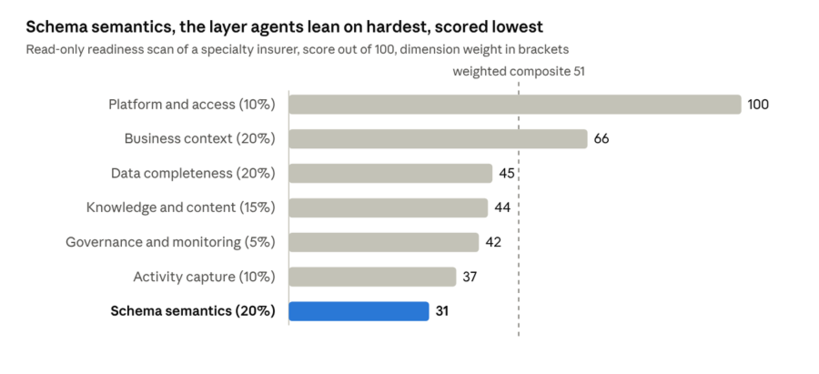
Readiness scan of a specialty insurer's HubSpot portal,
25–28 Sep 2026 · 657 API reads, 0 writes
In this assessment, business context was relatively strong, while schema semantics was one of the weakest dimensions. The overall score landed in the low 50s on our 100-point internal scale. That is a diagnosis of the portal's readiness, not a claim about live agent performance. Improving descriptions and option definitions is a useful early fix because it changes metadata without altering customer records.
These gaps also have financial consequences: when an agent cannot resolve a routine question, the work returns to a human team. We examine that cost later in the article.
The Private Business Brain: Knowledge Beyond the CRM
A CRM needs reliable operational information, but not every piece of organizational knowledge belongs there. Meeting discussions, draft operating procedures, pricing decisions and information restricted by a security owner may be useful for internal research without being appropriate for broad CRM or agent access. The right boundary depends on the organization's policies and the work an agent is authorized to do.
At Learners.ai, we build private business brains when the work calls for knowledge that lives beyond the CRM. A brain draws on approved meetings, project tasks and documents, organizes them with source evidence and controlled access, and makes relevant information available to people and agents. The organization controls what enters, who can query it and which systems are allowed to use it. This is a separate, governed knowledge capability, not a replacement CRM.
The technology follows the client's environment. In a HubSpot system design and build, verified knowledge can inform Growth Context and specialized agents. A Microsoft-centered organization may design around Microsoft IQ, Copilot and supported integration points. An AWS-centered organization can use services such as Amazon Bedrock Knowledge Bases for similar retrieval needs. Our role is to engineer the knowledge, permissions and connections so the systems the business already uses can work with reliable context. This does not depend on one vendor's agent platform.
The next section explains the architecture behind those controls. Readers focused on business applications can continue to “How the Private Business Brain Works With HubSpot.”
How a brain is built
| Plane | What it does | The design rule we will not break |
|---|---|---|
| Data | A dedicated tenant per organization in a multi-tenant vector database, with hybrid keyword and semantic search, its own index and a role scoped to that tenant alone | Every read and write asserts a tenant. A missing tenant is an error, never a fallback or a guess. |
| Memory | Always-in-context memory blocks per brain, including an entity map, glossary and recurring projects, with archival memory in the same vector store | One embedding store, not two. No knowledge graph until a measured need justifies one. |
| Gateway | One MCP gateway per brain. OAuth 2.1 with PKCE, federated to the organization's SSO; tokens bound to that one brain's audience; a per-user entitlement check and an audit line on every call | The gateway never passes the user's token downstream, as the MCP authorization spec requires. A token for brain A is useless at brain B. |
| Secrets and isolation | A container per brain; secrets in a secrets manager under attribute-based access, so each brain can read only its own; only a TLS proxy faces the network | No secret in code, logs or output. Ever. |
| Interface | Two deliberately small tools: search returns compact, ranked summaries with a relevance score; fetch returns one full document or one section of it | No business logic in the gateway. Retrieval logic, storage and models can each change without touching it. |
The data engineering is most of the work
The architecture matters, but reliable retrieval begins with the source material. Before anything is embedded, we apply the following steps:
- Staging with provenance. Every source lands in a raw staging layer first, with source, owner and timestamps; we do not push it straight into a vector index.
- Cleaning. Exact and near-duplicate detection, repair or rejection of unreadable records, and a relevance score for every item. Only engagement-relevant content reaches the brain; everything else is retained raw with a logged reason. Our standard is zero silent drops: every item ends processed, queued as an exception or excluded with a reason.
- Right-sized units. Long artifacts are chunked and summarized at write time, each unit carrying client, source, provenance and dates. Queries run under a hard context budget with mandatory tenant and source filters, and raw transcripts are never returned as answer text.
- Classification before embedding. A sensitivity gate runs before any write and fails closed. Deterministic detectors run first, and a model may tighten a decision but cannot clear a deterministic flag. Regulated identifiers such as claim references, account numbers and personal information belong in a separately governed store with its own access group, not in a brain open to broad querying.
- Configuration, not code. Identity mapping, source lists and a client's regulated status live in per-client configuration, so bringing on the next organization is a config entry, not a software release.
How the Private Business Brain Works With HubSpot
HubSpot is one important application of this wider capability. The private brain stores governed organizational knowledge drawn from selected internal sources. HubSpot holds the CRM records, approved business context and operational processes used by go-to-market teams and agents. Our job is to align the relevant facts without exposing draft or unverified material to customer-facing agents. Other systems can use the same approach through their own approved connections and permissions.
Our working rule is: the brain proposes, HubSpot disposes. A brain result is a research lead until it is verified against a live CRM record or a dated, approved source. Only verified knowledge is promoted for customer-facing use. HubSpot remains the first governance layer for CRM records, permissions, agent actions and audit history.
How knowledge gets promoted into HubSpot
- Charter the agents first. Each agent gets a one-page charter: its job, its users, the decisions it may and may not make, and the metric it will be judged on. Context work is aimed at an agent, never at "the portal" in general.
- Harvest. We query the brain, the meeting corpus, internal documents, the public web and read-only portal pulls for everything the chartered agents need, and assemble a context dossier with an evidence index citing every fact.
- Verify. Every brain-sourced fact is checked against the live portal or a dated source. Conflicts go to a named subject-matter expert, not to a model.
- Blueprint. We write a build-ready configuration: properties with full option sets and descriptions, ICPs and personas, brand voice, vault sets with cited file outlines, workflow specs that are born switched off, and custom-context notes. This step makes recommendations only; it writes nothing.
- Change, then verify. A written change plan goes to a named owner for approval, then executes in small batches, with a snapshot before bulk changes and a preference for marking rather than deleting, and is verified on a fresh read before the portal is re-scored.
- Rescan. On a cadence, we rerun the scan, diff it against history, confirm that what we built actually landed, sweep the brain for knowledge that arrived since the last harvest and flag evidence that has gone stale.
This process works in both directions. HubSpot can sync context from connected sources, give precedence to direct edits and flag information that may be outdated. If a meeting documents a product rename or a new escalation rule that conflicts with Context Home, our rescan raises the issue with the supporting source for an owner to review. Conversely, knowledge gaps identified through HubSpot’s Customer Agent can inform what the private brain records and what needs further review.
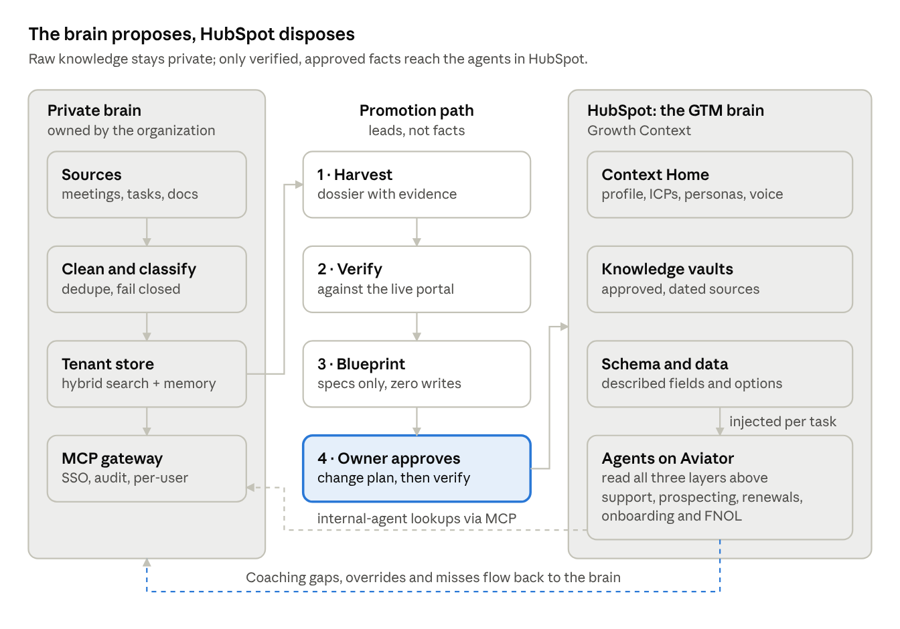
Knowledge promotion loop · private brain to HubSpot and back
In this HubSpot example, knowledge is verified and approved before promotion; agent feedback can then inform the brain's records. Other environments require their own integration and approval paths.
What this looks like on a real portal
- Personas are reviewed one at a time. HubSpot's Context tab will suggest personas. In one engagement five were pending. We reviewed each against the organization's own segmentation research and approved, edited or rejected it with a one-line reason. Never approve-all, and no invented personas.
- Scope is a context decision. A client's operations lead pushed back on loading every customer persona into the support agent's foundational context. He was right. The agent starts on one product lane, proves itself, and earns the next.
- Overlaps confuse agents. In the insurance assessment, several well-written ICPs had overlapping company-size bands. A human may read past that; an agent may pick one inconsistently. We resolve the boundaries before an agent relies on them.
Why Context Quality Matters to Agent Economics
HubSpot’s outcome pricing links the cost of Customer Agent to resolved conversations and Prospecting Agent to leads recommended for outreach. That is useful for customers, but an unresolved conversation can still carry a service cost when it reaches a human team.
When Customer Agent cannot resolve an issue, a human may need to pick it up after the customer has waited. HubSpot’s performance reporting and coaching tools help teams spot knowledge gaps, handoffs and other opportunities to improve. We extend that analysis by tracing recurring misses to the relevant knowledge, schema, instructions or workflow and process logic. Those operating costs do not necessarily appear on an agent invoice.
I think about it the way I would think about any unit-economics problem. With a resolution rate r, an outcome price of $0.50 and a fully loaded human cost per conversation C, the expected cost of a conversation is:
Expected cost per conversation = $0.50 × r + C × (1 − r)
Under this illustration, each additional percentage point of resolution is worth (C − 0.50) × monthly volume ÷ 100. With 10,000 routine conversations a month and an assumed human cost of $5 per conversation, that is $450 monthly per point. A hypothetical improvement from 30% to 65% resolution would represent about $15,750 a month, or $189,000 a year, under these assumptions. This is a scenario, not a measured customer outcome, and the comparison requires consistent resolution definitions.
Resolution rates reflect several factors, including the tasks assigned to the agent, channel mix, platform capabilities and the quality of the context it can use. We focus on four areas we can assess and improve: approved answers, readable CRM data, clear instructions and escalation rules, and actions that do not conflict with existing workflow and process logic. HubSpot’s reporting is the starting point; a layer-by-layer review helps identify the specific changes worth making. When comparing rates, we also check HubSpot’s resolution definition, because a billed resolution does not always mean that no human participated.
Two practical considerations also matter:
- Custom-agent usage has a cost. HubSpot provides estimated credit costs for agent runs, and actual costs may vary. Keeping retrieved context focused is sensible for efficiency and answer quality, but the effect on credit use should be measured rather than assumed.
- For financial services firms, context quality also affects customer trust and compliance. An agent relying on outdated cancellation terms or inaccurate policy information can give customers the wrong guidance. That is why we verify the information agents use, keep it current, and establish clear rules for when a human needs to step in.
The Agents We Run on This Context
Our work in financial services and adjacent businesses centers on five types of agent. Each has a defined job, an explicit boundary on what it may do, context appropriate to that job and human review for consequential decisions. Some use HubSpot’s native agents, while others involve specialized workflows and integrations.
| Agent | Its job | Context it leans on | What it never does | Hands off when |
|---|---|---|---|---|
| Customer Support | Resolve routine service questions with cited answers | Approved articles and vaults for one product lane; ticket and contact records; brand voice and guardrails | Execute refunds, cancellations or payment changes; interpret coverage; give legal or tax advice | There is no citation; the customer asks for a person; billing, refunds or access are involved; it is a complaint |
| Prospecting | Find in-market accounts and draft outreach for review | ICPs, personas, products, intent signals, exclusions, approved proof points | Send unreviewed outreach in a regulated line; invent a claim | A claim needs compliance review; the account is already a client |
| Renewals | Prepare every renewal and chase what is missing | Renewal dates, policy or membership terms, service and claims history, commitments made in meetings | Quote a price; change coverage or terms | Pricing, a coverage change or an at-risk signal is in play |
| Onboarding | Move new customers through milestones and catch the stuck ones | Milestone properties, signed agreements, entitlements and access state, SOPs | Re-send sequences or override workflow state by itself | A milestone is overdue, two systems disagree, or a signature fails |
| FNOL | Turn a notice of loss into a complete, structured claim intake | The loss signal, policy and insured match, the claims system's field dictionary, escalation rules | Create, update, invalidate or link a claim; those actions stay with a claims representative | There is a fatality or hazmat, no policy match, or low confidence |
Customer Support Agent
This one uses HubSpot's Customer Agent. Two engagements shaped how we approach it: a membership-based education and advisory business, and an insurance organization with complex service processes.
- One product lane at a time. Each product line has its own rules, and an agent asked to hold three sets of rules gets all three subtly wrong. Only guardrails and voice live in the global layer; product content stays product-scoped, so the next lane can be added without unpicking the first.
- Cite or escalate. Every answer must cite an approved source; no citation means the conversation goes to a person. An agent's scope follows the service categories supported by approved articles. In one insurance portal, the knowledge base began with substantial gaps, so building reliable content became more important than prompt tuning.
- Handoffs live in the existing pipeline. Billing, refunds and access revocation go straight to people. A customer asking for a human gets one immediately. SLA breaches alert a team lead. The agent identifies itself on every draft.
- Voice is tested, not hoped for. The membership business's tone guardrails (answer first, explain why, then give the next step, with a list of prohibited phrases) became a scored dimension on every test case.
- The failure that taught us the most. A membership business's earlier attempt at a support agent ran into a workflow conflict: the agent's assignment logic competed with existing ticket workflow and process logic. Before switching on an agent, we therefore map every field it writes, the workflows that write the same field and the agreed owner of each change. Several live workflows were already modifying ticket ownership and status, while others had overlapping triggers. Our rule is to extend existing flows where practical, resolve every write conflict and confirm that an agent cannot reopen a closed ticket by mistake.
- A baseline to beat. The membership business's existing single-channel agent resolved about 60% of conversations over 30 days; that was the floor the new agent had to clear. On the busiest channel with no agent, roughly one ticket in five was being reopened.
For insurance support, the boundaries are explicit in the agent's instructions: it can explain approved processes and status, but a licensed person handles coverage or claim judgments.
Prospecting Agent
We run HubSpot's Prospecting Agent on our own portal before we recommend it to anyone. We define separate ICPs for banks and credit unions, insurers, and wealth and asset managers. The quality of the agent’s recommendations depends on how tightly those segments are defined.
- Markets are tight on purpose. One buyer-intent market per vertical ICP. Intent data gets noisy fast when the ICP is broad, and at $1.00 per recommended lead, precision is cost control.
- Intent is tiered. HOT means visits to the contact page or deep service pages, or repeat visits; WARM means case studies and vertical pages; CATEGORY means thought leadership, which feeds nurture but never triggers a sales alert. Competitors, partners and internal traffic are excluded.
- Workflow and process logic is earned. We started with digests a human reviewed, moved to human-in-the-loop alerts, and only then switched on automatic adding for HOT net-new accounts, under credit limits.
- Regulated outreach has a gate. In a regulated line the agent drafts, a reviewer agent checks every claim against a vault of approved statements and regulatory language, and a person approves before HubSpot sends. Any claim about the firm must come from an approved claims register.
- It learns weekly. Every week we review what the agent recommended, what sales accepted or rejected and why, and adjust markets, criteria and personas, updating the criteria and context without retraining the model.
Renewals Agent
Renewal errors can have direct revenue consequences. In one portal we inherited, renewal transactions triggered new-customer workflows. Existing members were re-enrolled in onboarding and assigned new start dates. The problem required a CRM and workflow fix: we associated each renewal with the original relationship and defined a separate start-date rule for renewals.
The agent works inside the timing the business already runs on rather than inventing its own. At a specialty reinsurer we work with, renewal records open 90 days out with reminders at 60 and 30; at the membership business, a renewal ticket opens 60 days before expiry and goes to the account's assigned concierge. Within that window the agent:
- assembles a renewal brief: current terms, service history, open tickets, engagement, claims or loss-run history where it applies, and commitments made in meetings (drawn from the brain, verified before use);
- identifies what is missing for a renewal, such as current schedules, exposure summaries or updated supporting documents, and drafts the requests;
- drafts the producer's or advisor's outreach and handles routine renewal questions, escalating anything complex;
- flags at-risk signals: falling engagement, an unresolved complaint, a claim in the period.
It never quotes a price and never changes coverage or terms. Those are licensed, human decisions. Where renewal data lives in an agency management system, the Applied Epic renewal data we sync into HubSpot is what the agent reads.
Onboarding Agent
The onboarding agent exists because of a specific failure. At a membership business, onboarding depended on a signed agreement, cohort assignment, platform access, community access and a welcome survey. A member did not receive the original e-signature request, so a representative sent another. The member signed the replacement, but the workflow still waited for the first request. The error skipped its delays and released more than a month of onboarding messages at once, without assigning the member to a cohort.
The issue was not the use of workflows. Those workflows should continue to handle predictable steps. The onboarding agent watches for exceptions when a manual intervention changes the expected sequence:
- it reads milestone state on every new account: agreement sent and signed, cohort assigned, access confirmed, community active, survey complete;
- it detects stuck or contradictory states, such as an agreement signed with no cohort, two envelopes for one member, or emails sent out of sequence;
- it opens a reconciliation ticket with the evidence attached, and drafts member guidance from the approved SOP, including the lost-envelope procedure written after that incident;
- it never re-sends a sequence or edits workflow state by itself. Workflow permissions were tightened at the same time, so manual interventions need approval too.
For the insurance program discussed here, the proposed sequence places policy onboarding after support and FNOL because it depends on context established earlier. HubSpot Work, in public beta, is one workspace we are watching for managing onboarding projects against live customer context.
FNOL Agent
First notice of loss (FNOL) brings customer communication, data quality, system integration and regulated decisions into the same process. It is a useful example of why implementing an agent starts with understanding the workflow rather than choosing a model.
In an insurance engagement, an integration brought incident information into a HubSpot intake record, added supporting documents and prepared confirmed information for a claims system. That integration reached acceptance testing. The engineering target was to reduce a manual intake task that could take more than 15 minutes to a single-digit-minute process. This was a design target, not a measured production result. The agent work builds on that integration rather than replacing the claims professional.
Mapping the required fields with the claims team showed an important gap: incoming reports do not always contain the detail required by a claims system's classification options. Some information can be structured automatically, but the description and cause of loss still require human review. We designed the agent around that boundary.
- Extract and structure, never decide. The proposed agent extracts details from emails, forms and the reporter's own words, flags uncertain matches, and prepares the loss description and classification for a claims professional to review.
- Acknowledge and route. The agent can draft an acknowledgment under the relevant service target and route the intake to the designated claims contact. Serious incidents or incomplete matches are escalated to a person rather than handled automatically.
- Hard boundary. The agent does not have authority to validate coverage or create, amend or link claims in the claims platform. Those steps remain with authorized professionals.
- Know which sources to trust. Intake feeds may omit location details, supporting conditions or other fields a claims process expects. The agent's instructions identify which source is authoritative for each field and require it to mark missing information as unknown rather than invent an answer.
- Respect the line-of-business rules. One incident may require several related claim records. The information shared between them still has to be validated against each line's requirements before an authorized person confirms the intake.
- Test against real exceptions. The evaluation plan contains more than 20 labeled intake scenarios, including incomplete reports, duplicates, missing matches, urgent escalation and language differences, plus at least 10 boundary tests. The initial target is at least 80% first-capture field completeness, tracked separately from the 90% case-pass standard used for support agents. These are pre-release criteria, not reported production results.
- Separate upstream failures from agent failures. FNOL reporting reconciles source events, CRM intake records and claims-system records, so a feed interruption is not mistaken for a failure in the agent's reasoning.
The same approach can support growth teams in other financial-services businesses. At a bank, an agent might reconcile commercial-client onboarding requirements, relationship history and outstanding documents so a relationship manager can follow up at the right time. At an asset manager, an agent might connect investor interests, relationship history, product information and engagement signals across systems to help distribution teams identify opportunities, personalize outreach and deepen investor relationships. In each case, the engineering work connects information to the people responsible for the next decision.
Beyond these five, the same method runs other agents: an email-association agent and a submissions-intake agent at the reinsurer (where the job is to govern an existing parser, not rebuild it), and a meeting-prep agent for brokers and general agents.
The Engineering Rules We Apply
Context engineering depends on careful data preparation, CRM configuration, testing and change control. The rules below reflect what our team uses on client portals.
- Describe before you automate. Give active properties and relevant dropdown options clear explanations before an agent relies on them. These metadata improvements are reversible and are often a valuable early step.
- Remove false affordances. Empty and retired fields are usage-traced, backed up and archived. An agent will try to use any field it can see.
- Scope is context. One product lane, one channel and one pipeline per agent at launch. The agent widens its scope on evidence, not optimism.
- Cite or escalate. If the agent cannot point to an approved source, a person answers.
- Every fact has a date. Articles carry a verified-against date. Stale means withdrawn, not "probably fine".
- One writer per field. No field is written by both an agent and a workflow without a named resolution.
- Deterministic spine, probabilistic judgment. Workflows execute; agents summarize, classify, draft and recommend, inside the read, recommend, draft and act boundaries we set for each one.
- Budget the window. Right-sized retrieval units, mandatory filters and ranked selection. More context is not better context; relevant context is.
- Classify before you embed. The sensitivity gate fails closed, and deterministic detectors outrank models.
- Promote, never paste. Knowledge moves from a brain into HubSpot through verification and an approved change plan, never by copy and paste.
- Read first; gate writes. Start with read-only assessment. Require a change plan, a named owner’s approval and verification on a fresh read before applying changes. Snapshot before bulk changes and mark rather than delete.
- Configuration is evidence. Version and date agent instructions, prompts and workflow definitions, and enable appropriate audit logging. If someone asks why an agent said something, you should be able to trace the answer to its configuration and sources.
How We Improve Agents Without Retraining Models
When we describe an agent as improving over time, we do not mean its model retrains itself. We mean that evidence from production work changes the knowledge, instructions, routing and tests around it. In a regulated environment, each of those changes needs review.
We improve the inputs and evaluations surrounding the model rather than altering its weights. The feedback loops below show what changes, which evidence triggers the change and who approves it.
| Loop | What feeds it | What changes | Who approves |
|---|---|---|---|
| Evaluation | Production misses, new edge cases, red-team findings | The golden set grows; every miss becomes a permanent test case | Failing cases block release automatically |
| Coaching | Customer Agent coaching opportunities, including knowledge gaps, conflicting answers, handoffs and negative ratings, alongside its source-usage report | Articles and vaults: HubSpot's Knowledge Base Agent (public beta) drafts new articles and flags outdated ones | A named editor approves each article |
| Override | Every time a person overrides an agent's classification or draft, with the reason | Category definitions, routing rules, instructions | The process owner |
| Rescan | A scheduled rerun of the readiness scan, diffed against history | Gaps reopened, built fixes confirmed, stale evidence flagged | The engagement owner |
| Brain | Meetings, tasks and documents arriving daily | Proposed context changes, promoted through verification | The owner of the affected context |
| Method | Anything that surprised us: an API quirk, a misfiring probe, a rejected recommendation | Our own scanners, playbooks and agent templates, released as new versions | Our engineering lead |
The evaluation loop deserves detail, because it is what makes the others safe. A support agent's pack holds at least 50 sanitized real customer questions, at least 15 boundary probes it must refuse or escalate, and a red-team set: prompt injection hidden inside a customer message, requests for another customer's data, and false authority claims such as "support already promised me a refund". A case passes only if every dimension passes: correct outcome, a citation that resolves to an approved source, correct escalation, no unapproved claims, no cross-customer data. Our default thresholds are 90% on the golden set and 100% on boundary and red-team cases. Any configuration change re-runs the affected cases, and a regression blocks promotion.
The release ladder and the kill switch
Every agent climbs the same ladder. It is built switched off and checked against its specification. It runs internally against its evaluation pack. A named owner's approval is recorded before it touches a real customer, and then it goes live on one channel only, in draft-assist mode, capped at 10 runs a day, with every one of the first 50 drafts reviewed in detail. Full release follows, with two weeks of hypercare.
The kill switch is written before restricted release, not after an incident: exact disable steps, a named owner, a message to the team, and automatic triggers. Triggers include an unapproved claim reaching a customer, cross-customer data exposure, resolution rate or satisfaction below its minimum for three consecutive days, or a direct request from the client. Pulling the switch needs no approval. Restarting needs a fresh gate. We test the switch once before launch.
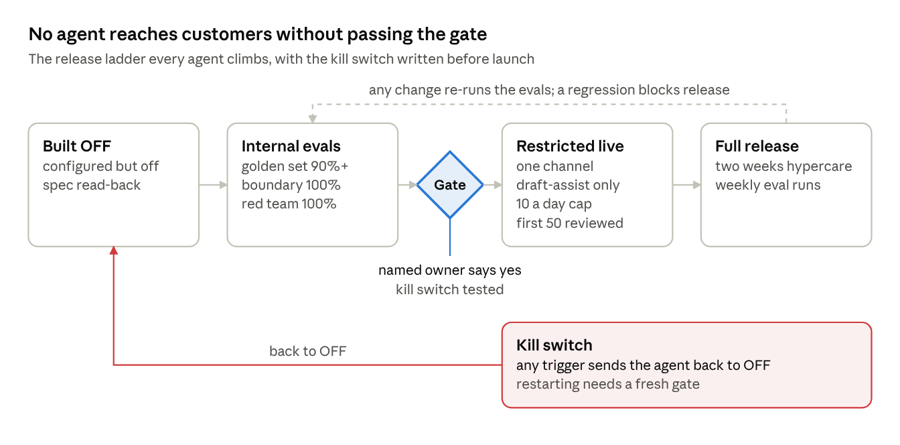
Release ladder · four stages, one gate, one kill switch
An agent moves right only by passing its evaluations and a named owner's gate; any kill-switch trigger sends it back to the start.
New agents come through a factory with a target of five working days: an idea card, a one-page spec naming the job, tools, evaluations and owner, a build from our templates, a passing evaluation suite, a named-owner gate, then deployment. Deployment registers the agent with monitoring, cost tracking and a run log. An agent that is not in the registry does not exist.
For teams with a finance background, the process resembles model validation: test cases establish the baseline, thresholds define release conditions, the kill switch limits exposure and exceptions require documented approval.
What To Verify Before Building
- Tier and credits. Customer Agent needs Professional or Enterprise; Agent Builder starts at Starter, but agentic workflows need Professional or Enterprise. Set a monthly run limit per agent and a 12-month credit forecast before go-live.
- AI settings. Access to generative AI, CRM data, conversation data and files data is a deliberate decision, and per-user AI permissions have been reviewed.
- Context Home. Company profile, products and services, ICPs that do not overlap, personas you approved one by one, and a brand voice you have read. Note the coverage figure HubSpot shows and what is missing.
- Schema semantics. Every property and dropdown option the agent will read has a description; empty fields are archived.
- Knowledge. Every service category in scope has an approved, dated article; vaults have owners and the right access level.
- Workflow and process logic. A dual-writer matrix, a reopen-safety check, and a map of which agent owns which channel and pipeline.
- Data boundary. Your security owner has signed which regulated data classes may move where, and the hosting region of any private brain is decided before data moves.
- Evaluation. Golden set, boundary probes, red-team cases and pass thresholds agreed in writing before the build starts.
- Kill switch. An owner, the exact steps, the automatic triggers, and one tested run.
- Baselines. Resolution rate, satisfaction, handle time and reopen rate measured before launch. A delta needs a before.
What To Avoid
- Approve-all. Accepting every AI-suggested persona or context item in one click writes guesses into the foundation every agent reads.
- One giant vault. A vault per topic, with an owner and a review date, beats one vault holding everything.
- Launching everywhere at once, or on a channel another agent already owns.
- A parallel triage workflow. Extend the one you have; two writers on one field is how agents fail quietly.
- Unverified brain output on a customer-facing surface. The brain is for research until a fact is verified and promoted.
- Quoting shadow-mode numbers as results. A plan threshold is not a production outcome until it is measured on live traffic.
- Buying "self-learning". It is a process you run every week, not a feature you switch on.
- Blaming the agent for upstream data. Reconcile the feed before you judge the agent.
The Opportunity for HubSpot Customers
HubSpot's evolution into an AI-powered customer platform creates opportunities for businesses that can put their data and operational knowledge to work. Effective agents depend on more than the model or the platform alone. They require sound CRM architecture, reliable data, appropriate integrations, well-managed workflow and process logic and clear authority over what each agent may do.
At Learners.ai, we combine nearly two decades of CRM experience with financial-services expertise and hands-on AI engineering. We treat the CRM, its data, connected systems, workflows and agents as one system design and build challenge. That lets us improve HubSpot's native capabilities, build specialized agents where the process calls for them and develop private business brains that make governed organizational knowledge useful across HubSpot and other systems. The aim is to build on the technology our clients already have, with results they can test and measure.
FAQ
What is context engineering in HubSpot?
Context engineering in HubSpot is the work of making an agent's inputs accurate, described, current and permitted: Context Home (profile, ICPs, personas, brand voice), knowledge vaults and articles, CRM schema and data, instructions, and available actions. HubSpot supplies the platform and agent capabilities; context engineering helps teams apply them reliably to specific tasks.
What is HubSpot Growth Context?
Growth Context is HubSpot's umbrella term for the platform's understanding of your business, your team and your customers. Since the 2026 Spotlight releases it feeds Breeze Assistant and every agent in Agent Hub, including custom agents built in Agent Builder. You manage its curated part in Context Home.
What is the difference between Context Home and knowledge vaults?
Context Home holds broad, standing context that applies across HubSpot's AI, including company profile, products, ICPs, personas, brand voice and team context. Knowledge vaults hold task-specific material, such as product documentation or support guidance, that you attach to particular agents or projects, with citations and access controls.
What is an agent harness, and what is HubSpot Aviator?
A harness is the software that runs a language model in a loop, executes its tool calls and feeds the results back. diginomica reports that HubSpot described Aviator at UNBOUND in September 2026 as its new agentic harness; partner recaps describe it selecting a model for each task and supplying the context that task needs.
Can HubSpot AI agents use private data without moving it into HubSpot?
Yes, with limits. A developer can package a custom MCP server in a HubSpot app (in public beta), and Agent Builder agents can then call it subject to the server's authentication and user entitlements. In our approach, live brain access is limited to authorized internal work such as renewal briefs and meeting preparation. Customer-facing agents rely on verified, approved information made available through HubSpot. The same private brain concept can support other platforms through their approved integration and governance mechanisms.
Can the private business brain work with systems other than HubSpot?
Yes. The brain is designed around the organization's knowledge and access policies rather than one CRM. It can be engineered to work with HubSpot, a Microsoft-centered environment using supported Copilot extensibility, or AWS services such as Amazon Bedrock Knowledge Bases. Which connections are appropriate depends on the systems already in place, supported interfaces and the organization's security requirements.
Why does my Customer Agent resolve fewer conversations than HubSpot's published rate?
HubSpot reports a 65% resolution rate for Customer Agent. A lower rate may reflect differences in channel mix and question complexity as well as gaps in knowledge, CRM field definitions, instructions or workflow design. Start with HubSpot’s reporting and coaching tools, then investigate the context and workflow and process logic behind recurring misses.
Do self-learning agents retrain the model?
Not ours. The model's weights stay fixed. What improves is the context and the evaluation around it: misses become test cases, knowledge gaps become approved articles, human overrides refine definitions, and every change passes the same release gates as the original build.
Which AI agents work best for insurers on HubSpot?
The strongest starting points are a customer support agent scoped to routine service categories, an FNOL intake agent that extracts and structures loss notices without deciding claims, a renewals agent that prepares and chases each renewal, an onboarding agent that watches milestones, and a prospecting agent with a compliance gate on regulated outreach.
What is the free Agent Readiness Scan?
The free Agent Readiness Scan is a bounded, read-only assessment of a HubSpot portal. It examines CRM property definitions, descriptions, option sets and fill-rate statistics without making changes to records. The data-access scope is confirmed before the scan. Within five business days of access, we provide a readiness score across seven weighted dimensions, quantify the three highest-priority gaps and discuss one example of how a gap could affect an agent in a 30-minute readout. Regulated firms also receive a draft data-boundary map for their security owner.
Where to Start
Start by checking what an agent would see in your portal. Our free Agent Readiness Scan is read-only. It reviews CRM schema, property descriptions, option sets and field-completeness statistics without changing records. We agree the data-access scope in advance. Within five business days of access, we provide a seven-dimension score, the three most significant gaps and one concrete example of how a gap could affect an agent. For insurers, brokers, banks and wealth firms, we also prepare a draft data-boundary map for the security owner to review.
If the scan shows the portal is ready, we will tell you. If it identifies material gaps, we offer a two-week, fixed-fee sprint with a working prototype tested on at least 20 sanitized cases from your business and a fixed-price build proposal. The sprint is invoiced once the deliverables are provided, and its fee is credited toward the build.
Book your free Agent Readiness Scan, or read how we approach insurance and benefits on HubSpot first.